Why quick chord checking matters during rehearsal
Practice and rehearsal are full of small moments that slow people down. You forget whether the chord was a plain major or a suspended variation. You want to confirm if the shape feels better in another position. You hear something different from the original recording and need a quick visual reference before continuing.
Those moments do not sound dramatic, but they add up. Every time you stop playing to search online, open another tool, or ask someone else to confirm the shape, the rehearsal loses momentum. ChordFlow is useful here because the chord reference is part of the same environment where you already read the song, transpose it, and review the structure.
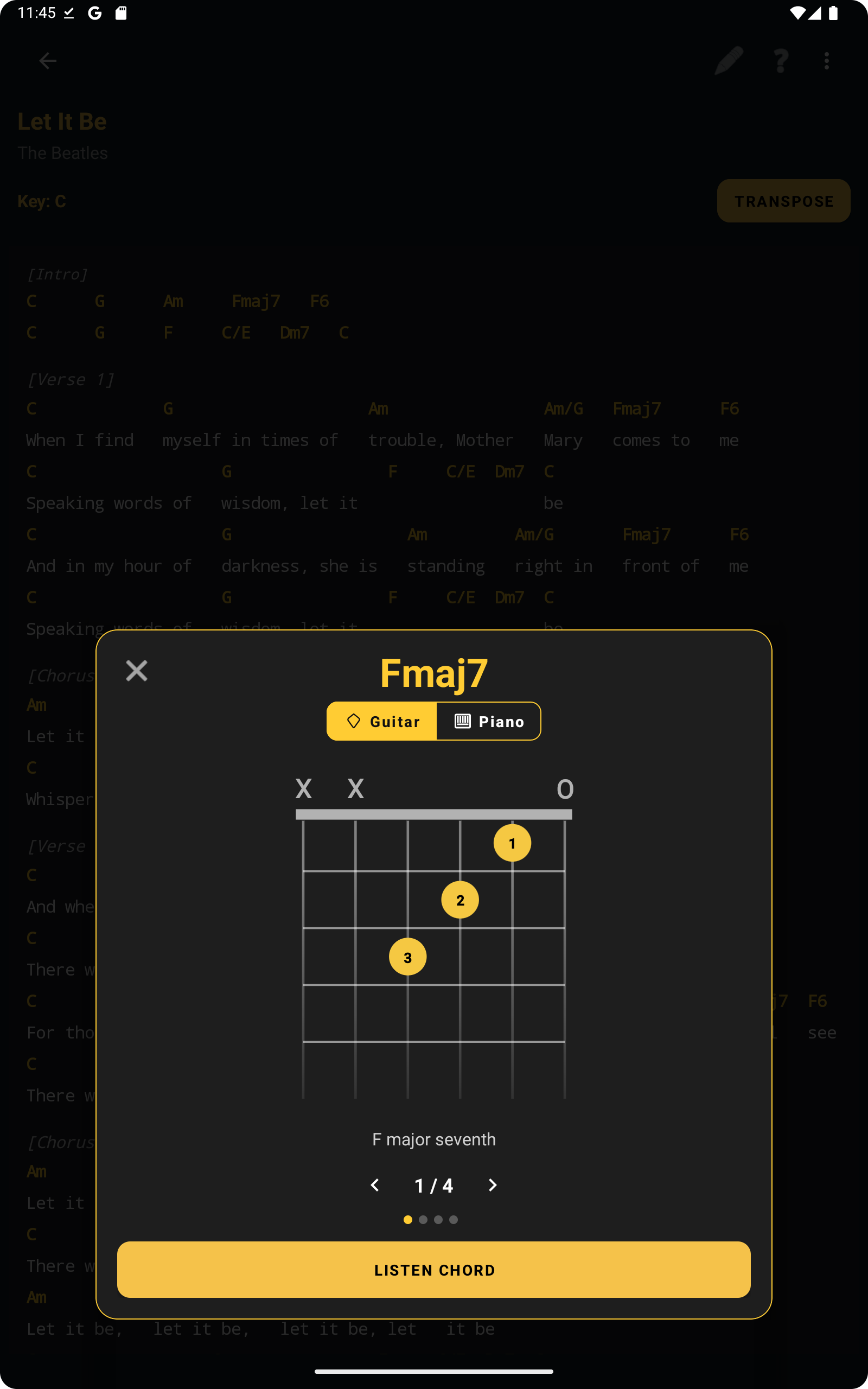
Tap a chord and open the guitar diagram immediately
The most practical part of this workflow is how direct it feels. When you are reading a song and want to confirm a chord, you do not need to leave the chart and start a separate search. You tap the chord and the guitar diagram opens right away, which is exactly what helps during a live practice session.
That makes a difference when you are learning songs, tightening transitions, or checking a variation in the middle of a verse. Instead of interrupting the whole session, you get the visual answer quickly and keep moving. It is especially useful for players who know the harmony conceptually but still want a fast reminder of the fingering.
Before the screenshot below, it helps to think of the guitar view as a quick confirmation tool rather than a separate study mode. It supports the song you are already playing instead of pulling you out of it.
Switch to piano view to understand the harmony better
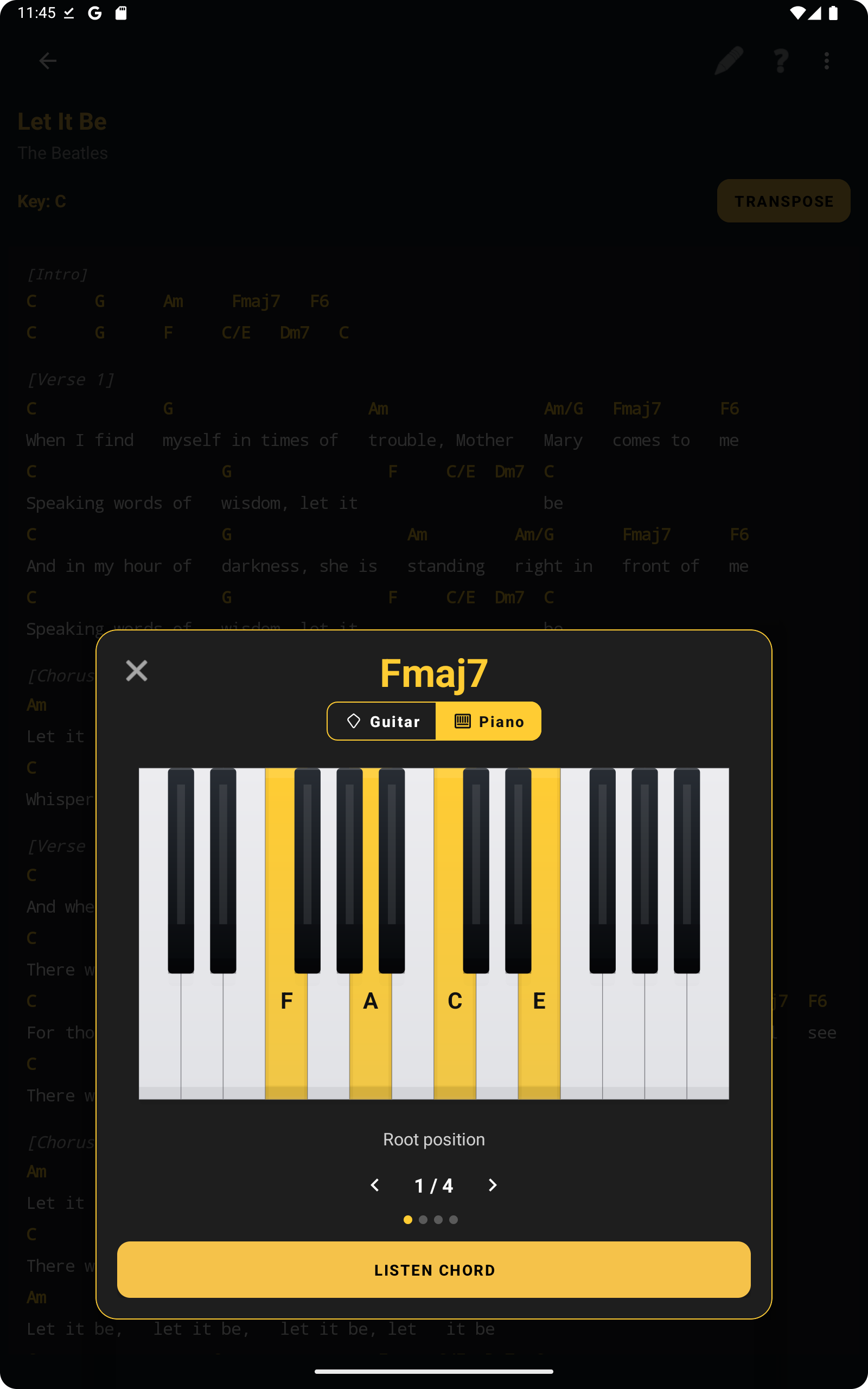
Sometimes the best way to understand a chord is not through a guitar shape but through the notes laid out on keys. That is why the piano view is useful even for musicians who mainly play guitar. It gives another perspective on the same harmony and can make the chord structure easier to understand at a glance.
This becomes practical when you are checking extensions, clarifying voicings, or working with other musicians who think more naturally in piano terms. If someone in rehearsal asks what is really inside the chord, the piano layout can answer that faster than a verbal explanation.
The next screenshot supports that point by showing how the piano view gives a clearer harmonic picture without forcing you to leave the app or open a different reference.
Listen to the chord inside the app
Visual confirmation is useful, but sometimes you want to hear the chord as well. ChordFlow supports that practical need by letting you listen to the chord directly in the same context. That is helpful when you are training your ear, double-checking a colour tone, or making sure a voicing sounds like what you expected.
For practice, this is especially useful when the chord name is familiar but the sound still needs to be reinforced. For rehearsal, it can help when someone wants to confirm whether the harmonic colour fits the arrangement before the group continues.
Stay focused instead of switching apps
The biggest workflow benefit is focus. Practicing a song should not mean constantly leaving the song. When the chart, the chord diagram, the piano view, and the chord audio all live in the same place, the session becomes more continuous and less fragmented.
That does not just save seconds. It keeps your attention on the music. The difference is obvious during repetition work, when the same section is being played several times and even a short interruption can break concentration. If your songs are already organized in ChordFlow, as described in this setlist workflow article, quick chord access becomes part of a smoother rehearsal routine. The same is true after importing songs from different sources, as explained in the import guide.
Works naturally with both song display modes
Quick chord checking is useful whether you prefer chords by section or lyrics with chords. If you work from a compact chart, tapping a chord helps you confirm shapes without losing the structural view. If you prefer lyrics with chords, the same reference stays available while you continue following the full song line by line.
That flexibility matters because musicians do not all read the same way. Some players want the cleanest possible overview. Others need the lyric context in front of them. ChordFlow supports both, and the chord-checking workflow fits naturally into either approach. If you want to compare those reading styles more carefully, it connects directly with this article about chords-only versus lyrics with chords.
For many musicians, that combination is what makes the feature practical: not just the diagram itself, but the fact that it stays connected to the actual song-reading view they already use.
FAQ
Can I check chords while reading a song?
Yes. That is one of the most practical parts of the workflow. You can open chord references while staying inside the song you are reading.
Do I need internet to view chord diagrams?
No. ChordFlow is designed to work offline, which is especially useful in rehearsal rooms, on stage, or while practicing away from a stable connection.
Can I listen to chords inside the app?
Yes. The built-in chord audio helps with quick confirmation and ear training during practice.
Does this work with both guitar and piano view?
Yes. You can move between guitar and piano chord views depending on what helps you understand or confirm the harmony more quickly.
Related Reading
Keep chord checking inside the same practice flow
When you can confirm shapes, hear the chord, and switch views without leaving the song, practice becomes smoother and rehearsals lose fewer interruptions. ChordFlow helps you stay focused on learning and playing instead of constantly searching for references elsewhere.
Free · No ads · Works offline